Polaris Scan1.14.307
Publisher Description
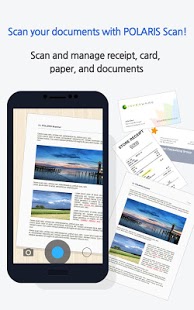
*Polaris Scan is optimized for Android phones. (Tablet support coming soon)*
"Easy Scan, Easy Share - Take photos and share them as PDFs!"
- Polaris Scan is a free scanner application for Polaris Office users.
- The Polaris Scan free and smart scanner will accurately scan documents and automatically save them on your cloud for convenient management and access on multiple devices.
*Polaris Scan uses your Polaris Office account*
[Primary Functions]
- Scan various documents like receipts, business cards, contracts, etc from your device’s camera and save them as PDFs
- Automatically recognizes and crops text area of pictures to make it more readable and apparent
- Outstanding auto correction function clean the background and make text more visible.
- Install Polaris Scan on your other devices, so scanned images can be viewed on any connected smartphone or tablet from anywhere, at anytime
- Free storage
- Share images and files with friends and colleagues
- Scanned images can be created as PDFs immediately and be shared via email or shared through Polaris Office
- Quick and convenient sharing with Polaris Office will be provided in future updates.
[Online Channels]
- Homepage : http://www.infraware.co.kr
- Facebook : www.facebook.com/polarisoffice
- Twitter : www.twitter.com/polarisoffice
- For any inquiries
Run the application > Select menu on top right > Setting > Customer Support > Select Ask Question
* Please share your feedback or comments on Polaris Scan, we will endeavor our best to provide you more improved and enhanced scanner application.
About Polaris Scan
The company that develops Polaris Scan is INFRAWARE, INC.. The latest version released by its developer is 1.14.307. This app was rated by 1 users of our site and has an average rating of 5.0.
To install Polaris Scan on your Android device, just click the green Continue To App button above to start the installation process. The app is listed on our website since 2014-08-24 and was downloaded 44 times. We have already checked if the download link is safe, however for your own protection we recommend that you scan the downloaded app with your antivirus. Your antivirus may detect the Polaris Scan as malware as malware if the download link to com.infraware.polarisscanner is broken.
How to install Polaris Scan on your Android device:
- Click on the Continue To App button on our website. This will redirect you to Google Play.
- Once the Polaris Scan is shown in the Google Play listing of your Android device, you can start its download and installation. Tap on the Install button located below the search bar and to the right of the app icon.
- A pop-up window with the permissions required by Polaris Scan will be shown. Click on Accept to continue the process.
- Polaris Scan will be downloaded onto your device, displaying a progress. Once the download completes, the installation will start and you'll get a notification after the installation is finished.
Program Details
System requirements
Download information
Pricing
Version History
version 1.14.307
posted on 2014-08-24
version 1.14.307
posted on 2014-08-24
Several fixes and updates
